iar-logo
A product by Auditzy™
Home
Domain Setup
Link In Bio
SmartLink
Deep Link
Use Cases
Blogs
Pricing
Shubham
Shubham Saurabh
Co-founder & CEO

Or write to us at
support@inappredirect.com

The link in bio that actually works

The Free Link in Bio Tool That Opens in Chrome & Safari

Every other link-in-bio tool opens your links inside Instagram's or Facebook's built-in browser. InApp Redirect opens them in Chrome or Safari instead. That means every link you add loads in your visitor's real browser, where tracking works, payments convert, and apps open properly. More trust. More sales. More accurate data.

No credit card required.

Why Does Your Link in Bio Open Inside Instagram?

(And Why It Hurts You)
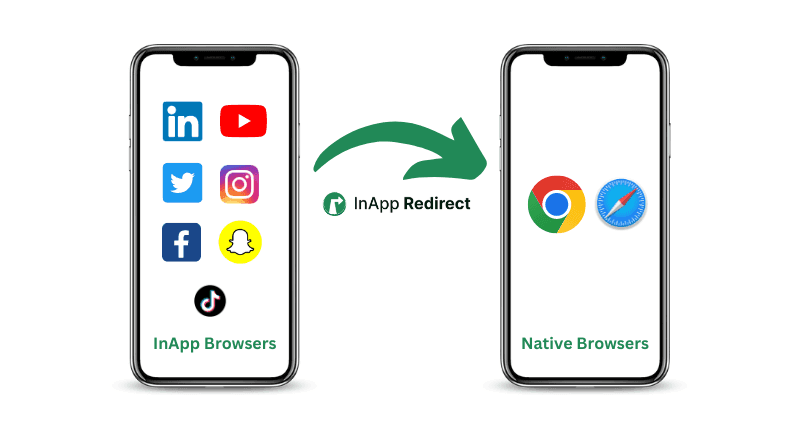
When someone taps your link in bio on Instagram or Facebook, it doesn't open in Chrome or Safari. It opens inside a built-in "in-app browser" — a stripped-down, restricted browser embedded inside the app itself.

Tracking breaks

Your Google Analytics, Meta Pixel, and attribution tools behave inconsistently inside in-app browsers — leading to missing conversions and unreliable data.

Cookies behave differently

Login states, cart persistence, and retargeting pixels often fail to fire correctly inside Instagram's in-app browser.

Trust drops

Users can't see the full URL, can't verify your SSL certificate, and can't use saved passwords — all reducing checkout completion rates.

App deep links don't work

If you're linking to Spotify, Amazon, or your own app, in-app browsers often block the redirect to the native app.

Most link-in-bio tools don't solve this. InApp Redirect is built specifically to fix it.

Who Needs a Link in Bio That Opens in a Real Native Browser?

eCommerce Sellers & Shopify Stores

In-app browsers block cookies, break checkout flows, and prevent autofill. Send your Instagram shoppers to your Shopify store in Chrome — where they can actually buy.

Affiliate Marketers

Affiliate tracking pixels and UTM parameters behave unreliably inside in-app browsers. InApp Redirect ensures your commissions are tracked accurately.

Musicians & Artists on Spotify/Apple Music

Links to Spotify inside Instagram's browser often fail to open the Spotify app. InApp Redirect ensures your music link opens the Spotify app directly.

Content Creators & YouTubers

Get your YouTube subscribers counted accurately. In-app browser views don't always register properly — send fans to the real YouTube app.

Service Businesses & Coaches

Your booking forms, Calendly pages, and payment links need full browser support. Stop losing bookings to broken in-app sessions.

App Developers

Promote your app download from Instagram or Facebook. InApp Redirect fires the App Store / Play Store deep link correctly — something in-app browsers often block.

Know Exactly What's Working — With Accurate Analytics

Because your visitors are in a native browser, your analytics are actually accurate. No more inflated bounce rates from broken in-app sessions.

Link Click Analytics

Total clicks, clicks per link, click-through rate by link. Updated in real time.

Browser & OS Report

Are your followers mostly on iOS Safari or Android Chrome? Shape your strategy accordingly.

Location Heatmap

City and country breakdown. Unlock geo-targeted opportunities for campaigns and events.

How it works

A smart redirect flow that runs in milliseconds

Every click runs through an intelligent routing engine that gets users where they convert best.
01

Instagram / Facebook Link in Bio Click

A visitor taps your bio link inside the Instagram and Facebook mobile app.

02

We Detect In-App Browser

InApp Redirect instantly identify the InApp Browser WebView.

03

Open Chrome / Safari

The link escapes to the user's native browser.

04

Open Mobile App

Supported destinations deep link straight into the app.

05

Fallback to Website

No app installed? We route cleanly to the web.

Smart link in bio preview

Smart link in bio

The Only Link in Bio Built for Instagram Conversions

A beautiful, customizable bio page that does what Linktree can't — it breaks users out of the in-app browser and routes them into native apps automatically.
  • Open outside Instagram browser
  • Deep link into apps
  • QR code support
  • Smart analytics
  • Templates & customization

Analytics

Browser Intelligence Analytics

See exactly where conversions are won and lost, with device, browser, and deep link data Linktree never shows you.
145,997
Total clicks
41,305
Total Bio Views
2%
CTR

Browser distribution

Chrome58%
Safari31%
In-app11%

OS distribution

iOS62%
Android36%
Other2%

Location distribution

United States45%
United Kingdom20%
Canada15%

How InApp Redirect Opens Your Bio Links in Chrome & Safari

Every day your bio link opens inside Instagram's browser, your affiliate clicks go untracked, your checkout pages lose customers to friction, and your app links go nowhere. Every other link-in-bio tool leaves this problem completely unsolved. InApp Redirect is the only one built around fixing it — and it's free to start.

Create Your Bio Page

Use our simple bio page builder. Add your links, images, videos, your social handles, brand colors etc. It takes under 3 minutes.

Add Your InApp Redirect Bio Link URL to Instagram, Facebook, or anywhere you want

Copy your unique InApp Redirect link and paste it into your Instagram or Facebook bio. That's the only URL your audience ever sees.

Every Click Opens in Chrome or Safari

When a follower taps your bio link, our redirect technology detects the in-app browser and pushes them to Chrome, Safari, or their default browser — automatically.

Everything You Get With InApp Redirect

InApp Redirect Link in bio is a smart bio link that redirects Instagram and Facebook traffic to open in native browsers like Safari or Chrome instead of in-app browsers. This means you get accurate attribution, reliable checkout, and higher conversions from your social traffic — without any code changes or platform workarounds.

Native Browser Redirect

Your bio page and all links inside it open in Chrome, Safari, or the user's default browser — bypassing Instagram and Facebook in-app browser automatically.

Simple Bio Page Builder

Add unlimited links, images, videos, bio text, social icons, and custom colors etc. No coding. No design skills needed. Live in under 3 minutes.

App Deep Link Support

Send users directly into mobile apps like (Spotify, Amazon, YouTube etc.) instead of a broken in-app webview that fails to redirect.

Click Analytics Dashboard

See exactly how many people clicked, which links they tapped, and when. Understand your audience behavior at a glance.

Browser & OS Breakdown

Know whether your audience is on Chrome, Safari, Firefox, Android, iOS, or desktop. Optimize your content accordingly.

Location Analytics

See which cities and countries drive your clicks. Perfect for geo-targeted campaigns and understanding your audience.

💡
All the links on your bio page — your store, your YouTube, your newsletter — also open in the native browser. Not trapped inside the bio page's own webview.

InApp Redirect vs Linktree

FeatureInApp Redirect Link In BioLinktree and Similar Link in Bio Tools
Opens in Chrome/Safari From Instagram and Facebook
Bypass Instagram and Facebook Browser
Mobile app deep linking
QR Code Generation
Analytics and Click Tracking

Frequently Asked Questions

Everything you need to know about InApp Redirect Free Link In Bio Tool, and how it improves your conversions, engagements and attributions.

An in-app browser is a built-in browser that apps like Instagram, Facebook, and TikTok use to open links without leaving the app. Unlike Chrome or Safari, in-app browsers are stripped-down, controlled by the app, and lack features like autofill, password managers, saved cookies, and full security indicators. When you click a link inside Instagram, it opens in Instagram's own browser — not your phone's real browser.

Instagram opens links in its own built-in browser to keep users inside the app and to track their browsing behavior. When you tap a link on Instagram, the app intercepts it and loads the page within Instagram itself. This means Instagram can monitor what you do on external websites, collect behavioral data, and make it harder for users to leave the app. It is a deliberate design choice, not a technical limitation.

To open Instagram bio links in Chrome or Safari, use a link-in-bio tool that performs a native browser redirect — like InApp Redirect. When a visitor taps your bio link inside Instagram, InApp Redirect detects the in-app browser and automatically redirects them to their default native browser (Chrome, Safari, etc.) before loading your bio page. Without a tool like this, Instagram always opens bio links inside its own browser.

Yes. In 2022, a security researcher found that Instagram's in-app browser injects custom JavaScript code into every website you visit while using it. This code can potentially monitor keystrokes, form inputs, and button clicks on external websites — even if the website itself does not have Meta tracking. Using a native-browser redirect tool means your visitors leave the in-app browser before reaching any page, bypassing this tracking entirely.

InApp Redirect uses a browser-detection redirect technique. When a visitor taps your bio link from Instagram or Facebook, our system detects the in-app browser environment and automatically triggers a redirect that opens the page in the device's default native browser.

Affiliate links often fail to track correctly when clicked from Instagram because Instagram's in-app browser blocks third-party cookies. Affiliate networks rely on cookies to attribute a sale to the correct referral link. When the browser blocks these cookies, the network cannot track the click, and you don't receive credit for the sale. To fix this, use a link-in-bio tool like InApp Redirect that opens all links in a native browser where cookies work correctly.

Yes. InApp Redirect detects and escapes the in-app browser on both Instagram and Facebook, as well as other apps like Threads and Messenger that use in-app browser webviews.

Yes. Not just your bio page itself, but every link you add inside your bio page — your website, your store, your Spotify, your YouTube — will also open in the native browser when tapped from the bio page.

Yes. InApp Redirect offers a free plan that includes unlimited bio clicks, link clicks, native browser redirect, deep-linking and basic analytics. A paid plan is available for advanced analytics, branding removal, and additional features.

Yes. One of the key benefits of escaping the in-app browser is that app deep links — links designed to open a specific app — work correctly in a real browser. In-app browsers often block these redirects.

The core difference is the native browser redirect. Linktree and other major link-in-bio tools open inside Instagram & Facebook in-app browser by default. InApp Redirect was specifically built to solve this problem, while also offering a clean bio builder and accurate analytics.

A link in bio tool is a service that creates a simple webpage containing multiple links, designed to be placed in the single clickable link allowed in an Instagram, TikTok, or Facebook bio. Because social platforms only allow one link in the bio section, creators use these tools to host all their important links — websites, products, social profiles, content — in one place. When followers click the bio link, they see a page with all the links organized clearly.

InApp Redirect works by detecting when a visitor arrives from an in-app browser — like Instagram's or Facebook's — and redirecting them to their native browser (Chrome, Safari, etc.) before loading your bio page. You build your bio page in InApp Redirect's editor, place your InApp Redirect URL in your Instagram bio, and every follower who clicks it is automatically redirected to their real browser. The redirect is instant.

Yes. When links open in a native browser like Chrome or Safari, deep links — URLs that point directly to a mobile app — work correctly. If you add a Spotify link to your InApp Redirect bio page, clicking it will open the Spotify app on your follower's phone. The same applies to YouTube, Amazon, the App Store, and any other app that supports deep linking. In-app browsers typically block or ignore deep links, which is why this feature requires a native browser redirect.

InApp Redirect is a link in bio tool designed specifically for Instagram, Facebook, Threads, and Messenger users. Unlike traditional bio page builders, it automatically opens links in Chrome or Safari, allowing deep links, affiliate tracking, payment autofill, and mobile app opening to work correctly

Stop Letting Instagram and Facebook InApp Browsers Trap Your Audience

You've built an audience. Don't let Instagram's in-app browser stand between them and your store, your music, your content, or your app. Create your InApp Redirect bio link in under 3 minutes — free, no credit card needed.

No credit card required · Get started in minutes

Discover more with our blogs

open-ads-link-in-external-browser
shubham
3 minute read
How to Open Links in Default Mobile Browser Instead of In-App Browser?
Discover methods for directing links to open in the system browser rather than within the confines of an in-app browser for a better browsing experience.
Social-Ads-ROAS-image
shubham
3 minute read
Boost Social Ads ROAS with Native Browser Redirects
Discover how redirecting social ad clicks to native browsers can enhance your Return on Ad Spend (ROAS) and improve campaign performance.
open-links-in-external-browser
shubham
3 minute read
Opening URLs in External Browsers: A Quick Guide
Follow simple steps to direct URLs to open in external browsers for improved functionality and accessibility across various devices and platforms.
Demo-Image-1
shubham
3 minute read
Security of In-App Browsers: What You Need to Know
Learn about the security considerations of in-app browsers and how to ensure a safe browsing experience.
How-to-bypass-facebook-browser
shubham
3 mins minute read
How to Bypass Facebook's In-App Browser for Better Website Conversions and ROAS with InApp Redirect
Discover how to bypass Facebook’s in-app browser to boost your website conversions and improve ROAS. Learn how InApp Redirect ensures a seamless user experience.
Inapp-browsers-vs-native-browsers
shubham
3 minute read
What is the Difference Between In-App Browser and Default Browser?
Understand the difference between in-app browsers and default browsers and how they impact your browsing experience.
Inappredirect-homepage-preview-image
shubham
3 minute read
How to Increase Meta Ads Conversions? (The Hidden Fix Most Brands Ignore)
Improve Meta ads performance by fixing in-app browser issues. Redirect users to native browsers to increase ATC, checkout completion, and ROAS.
poor-roas-image
shubham
3 minute read
Why In-App Browsers Are Killing Your Conversions (And How You Can Stop It!)
Discover how in-app browsers are hurting your social media ad conversions by limiting user experience. Learn how you can redirect users to default browsers, save their session, and boost your conversion rates with InApp Redirect!
How-to-bypass-instagram-browsers
shubham
3 minute read
How to Bypass Instagram’s InApp Browser for Better ROAS with InApp Redirect
Discover how to boost social media ads ROAS results by bypassing Instagram’s InApp Browser using InApp Redirect. Improve user experience, tracking accuracy, and conversions effortlessly.
arrow

Don't get left behind—social media ad conversions now matters more than ever!

© 2026. All rights reserved. Auditzy Technologies Pvt Ltd
Built by engineers who understands browser!

Ready to boost your social ads conversions?

Start For Free
Book a free discovery call
Or write to us at

support@inappredirect.com