
How to Increase Meta Ads Conversions? (The Hidden Fix Most Brands Ignore)
Meta ads are one of the most powerful acquisition channels for modern brands.
They scale fast, bring high-intent traffic, and give you a huge creative surface to experiment with.
If you want to understand the root cause from a bigger perspective, we break it down in detail here: Why In-App Browsers Are Killing Your Conversions.
But what have we observed, most brands struggles in conversions and the reason is not your ad copy or your strategy, of-course you have done it right but here is the hidden meta ads conversion killer:
Most Meta ad traffic is not converting as well as it could, not because your ads are bad, but because your users are opening your site inside Instagram/Facebook’s in-app browser.
This browser is not Chrome 😲
It’s not Safari 😲
It’s a stripped-down WebView with limitations that silently kill conversions also know as InApp-Browsers. 🤨
We’ve also compared these environments technically in: What’s the Difference Between an In-App Browser and a Default Browser?
If you’ve ever wondered:
“Why is my ATC rate lower than expected?”
“Why do returning users behave like new users?”
“Why are checkout drop-offs so high on mobile Meta traffic?”
This is likely the reason.
These symptoms appear heavily on Instagram traffic — this guide explains why: How to Bypass Instagram’s In-App Browser.
In this post, I’ll break down:
Why Meta ads lose conversions inside in-app browsers
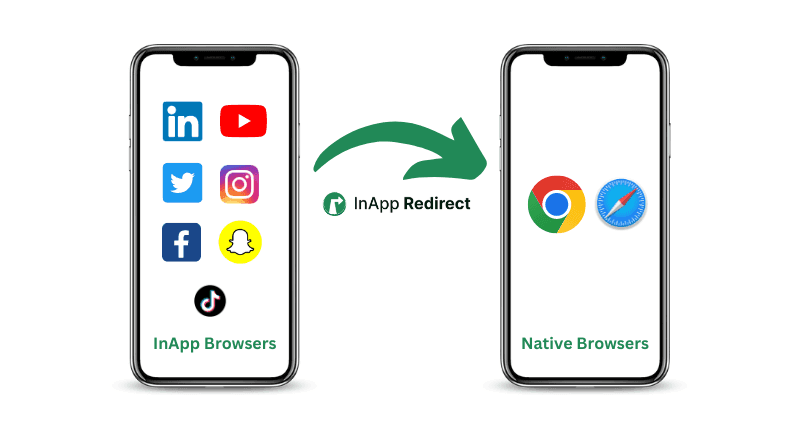
How redirecting users to their native browser increases conversions
Two ways to maximize your redirection success rate
How to track redirected users in GA4 and measure uplift
Real funnel improvements brands are seeing
Let’s get into it.
1. The Real Reason Your Meta Ads Aren’t Converting: In-App Browsers
When a user clicks a Meta ad, the default behaviour is:
👉 Instagram opens your website inside Instagram itself
👉 Facebook opens your website inside Facebook itself
This internal browser causes problems like:
No saved login session
Users have to log in again, most drop.
No payment and address autofill
UPI/card autofill fails → more friction → lower conversions.
Broken Attribution
Most of the time brands see broken attribution and that's because of InApp Browsers itself.
Broken attribution is one of the biggest reasons ROAS dips on Meta campaigns, covered here: Boost Social Ads ROAS With Native Browser Redirects.
Cookies don't persist
Returning customers become “new” customers → wrong personalisation → lower AOV.
These small frictions add up and dramatically reduce:
ATC rate
Begin Checkout
Payment initiation
Final conversion
Revenue per session
Most brands assume it’s a “landing page problem” or “ad problem.”
But it’s neither, the browser environment is the issue.
This also happens inside Facebook’s in-app browser. See how brands overcome it: How to Bypass Facebook’s In-App Browser.
2. The Fix: Redirect Users to Their Native Browser
The moment users open your site in Safari/Chrome, everything changes:
- Autofill works
- UPI/card selection is smooth
- Login state is restored
- Session tracking becomes accurate
- Cart and checkout become reliable
This alone lifts conversion significantly.
Brands using InApp Redirect have seen 5–25% uplift in Meta ad conversions, without changing creatives, budget, landing pages, or offers.
To understand why native browsers convert better, here’s a short breakdown: Opening URLs in External Browsers — A Quick Guide.
So the most important question becomes:
How do you increase the percentage of users who successfully move from the in-app browser to their native browser?
This is where redirection strategy matters.
If you need a simple setup guide, this tutorial helps: How to Open Links in the Default Browser.
3. How to Increase Your Redirection Success Rate
InApp Redirect gives you two ways to guide users out of the in-app browser.
These approaches significantly affect your final conversion rate.
Option A: One-Time Nudge Per Session (Recommended for eCommerce)
This is the most user-friendly and most widely used strategy.
How it works:
When a user first lands on your site inside Instagram/Facebook,
they see a single redirect banner/footer.If they choose not to redirect, we don’t disturb them again.
But they still see a floating widget that allows them to redirect anytime.
Why this works well:
It doesn’t feel pushy
It respects session behaviour
It still encourages users to continue in a better browser
Checkout becomes smoother where it matters most
You can configure:
Banner delay (default 1 sec, can go as low as 100ms)
On/off widget
On/off footer
Platform-specific behaviour (iOS/Android)
Branding preferences
Optimizing these settings lifts your redirection success rate, which directly lifts your conversion rate.
Option B: Redirection Attempt on Every Page Switch (Aggressive Mode)
This is an assertive approach used typically by:
Publishers
SaaS landing pages
Forms
Lead-gen flows
Content websites
Adult Platforms
How it works:
Every time users move from Page A → Page B inside InApp Browser,
they get nudged again to move into the native browser.
Result:
Very high redirection coverage
More sessions occur in Safari/Chrome
Higher overall conversions (for non-eCommerce setups)
For e-commerce, this may feel aggressive, but in long reading or signup flows, it works beautifully.
This approach is commonly used for publishers and lead-gen businesses — similar patterns discussed here: Why In-App Browsers Hurt Conversions.
There are multiple redirection workflows depending on your business model — we’ve explained them with examples in: In-App Browser Redirection Use Cases.
4. How to Track Redirected Users in GA4 (and Measure the Uplift)
Every redirected user automatically gets tagged with:
utm_term=inappredirect
You can now create two segments:
Segment 1: Redirected Users (utm_term=inappredirect)
Segment 2: Users Who Stayed in In-App Browser
Compare these funnels:
ATC rate
Begin Checkout
Payment initiated
Final purchases
AOV
Session time
Bounce rate
You will see redirected users consistently outperform the users who chose to stay inside the InApp browser.
Example:
Brands often report:
+5–20% improvement in ATC
+5–30% improvement in checkout completion
+5-20% increase in revenue per session
When you improve the redirection success rate, these numbers go even higher.
If you want to explore browser behavior differences behind these numbers, here’s a clear comparison: In-App Browser vs Default Browser.
5. How to Know if Your Redirection Strategy Is Working
Inside GA4 or any analytics tool, look for these signals:
- Redirected users have lower bounce rate
- Higher session duration
- More pages per session
- More ATC started
- Higher conversion rate
These are the clearest signs that in-app → native browser redirection is improving your bottom funnel.
You can also benchmark performance using insights from: Boost Social Ads ROAS With Native Browser Redirects.
For brands evaluating safety or compliance, it’s also important to understand the privacy limitations of in-app browsers: Security of In-App Browsers — What You Need to Know.
Conclusion:
Increasing Meta Ad Conversions Is Not About Ads Optimisation only, It’s also About Fixing the InApp Browser!
Most brands focus on:
Creative
Landing page
Targeting
Budget optimisation
Offers
But they ignore the environment where the user lands.
If your Meta traffic opens in a restricted in-app browser, your entire funnel gets handicapped.
By:
Nudging users to open your site in the native browser
Increasing redirection success rate
Tracking redirected users
Optimizing the nudge configuration
you unlock conversions that were already yours, just stuck behind the wrong browser.
This is the simplest, highest-ROI improvement for Meta ad performance today.
If you'd like help setting up or optimizing the right redirection strategy for your brand, our team is here to help, please reach out to support@inappredirect.com
If you want to explore the full feature set, visit the InApp Redirect Homepage.
Written by
About the author

Shubham Saurabh
Connect on LinkedInShare this article
Found it useful? Pass it along.