
For performance and digital marketers, optimizing every step of the user journey is critical for achieving profitable ROAS. One of the most overlooked blockers happens right after the click, when social ad URLs open inside in-app browsers rather than in Chrome or Safari.
In-app browsers slow down the experience, break tracking, reduce trust, and ultimately kill conversions. If you’ve ever wondered why Meta ads convert lower than expected, this deeper explanation will help — and you can explore more reasons in our detailed post:
👉 Why In-App Browsers Kill Your Conversions.
In this guide, you’ll learn how opening URLs directly in the default mobile browser significantly improves user experience, tracking accuracy, and social ads performance, and how InApp Redirect makes this possible with a simple script.
Why In-App Browsers Hurt Social Ads Performance and ROAS
In-app browsers (WebViews inside Instagram, Facebook, etc.) exist for user convenience, but for marketers, they quietly damage ROAS. This is especially important if you run Meta ads, covered in detail in:
👉 How to Increase Meta Ads Conversions.
Here’s why in-app browsers hurt your funnel:
1. Slower Load Times = Higher Drop-offs
Pages load significantly slower inside app-embedded browsers.
Auditzy (our parent company) analyzed over 2B+ sessions and found Instagram’s in-app browser to be up to 15% slower, leading to bounce spikes.
For Instagram-specific impact, check our guide:
👉 How to Bypass Instagram’s In-App Browser.
2. Missing User Features
In-app browsers lack core comforts:
Saved passwords
Autofill
Multiple tabs
Bookmarks
Persistent cart memory
Buy-later behavior
The experience feels unfamiliar and clunky.
Facebook’s WebView behaves similarly — more details here:
👉 How to Bypass Facebook’s In-App Browser.
3. Tracking & Attribution Failures
In-app browsers break:
Cookie persistence
Session continuity
Pixel accuracy
Conversion tracking
Attribution models
This means bad data → wrong decisions → wasted ad spend.
If you're exploring secure browsing behavior differences, this comparison will help:
👉 Difference Between In-App Browser and Default Browser.
How Native Browsers Improve Campaign Performance
Opening URLs in Chrome or Safari allows users to interact with your website the way they expect.
1. Faster, Smoother User Experience
Native browsers offer unmatched speed and reliability.
This reduces friction in forms, checkout flows, and multi-step journeys.
2. Accurate Tracking
Native browsers fully support:
Cookies
GA4
Meta Pixel
Server-side tracking
Retargeting
For more performance-centric insights, explore:
👉 Boost Social Ads ROAS with Native Browser Redirects.
3. Higher Trust & Conversion Intent
Users feel safe entering payment details on familiar browsers.
That sense of security directly improves conversion rate.
InApp Redirect: Direct Redirection Flow
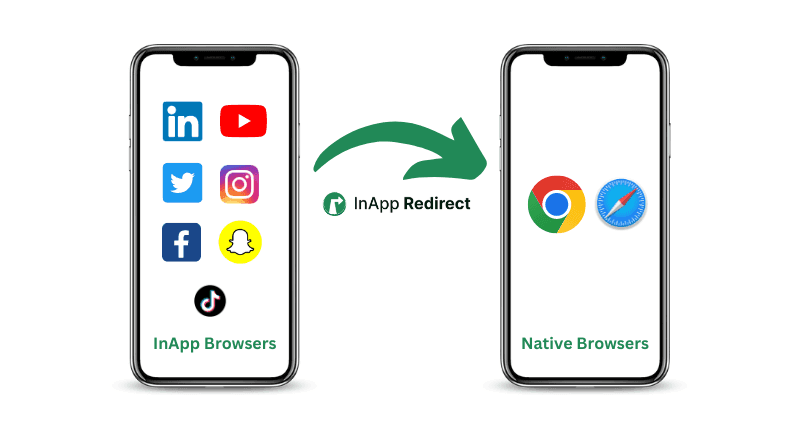
InApp Redirect offers a seamless way to automatically move users from in-app browsers to their native browser the moment your website loads.
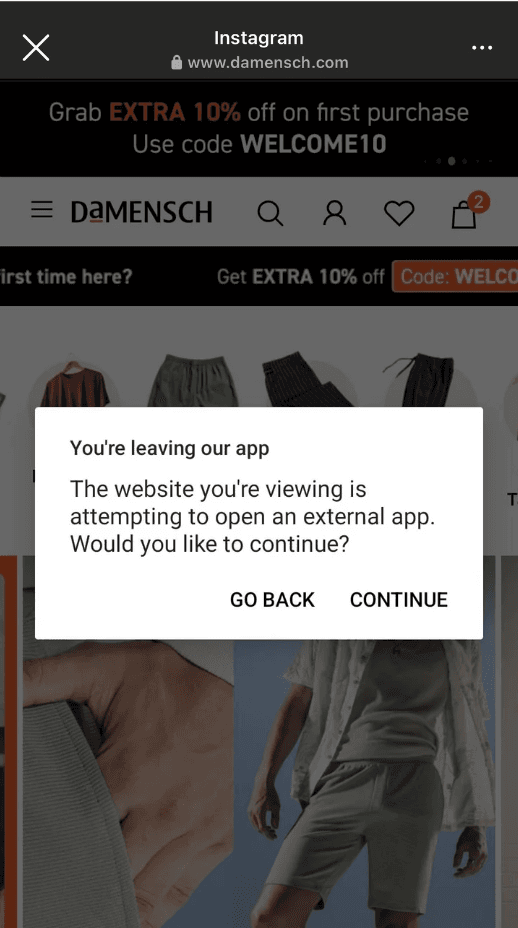
- iOS Users: After an initial consent prompt, users who agree will be redirected automatically in the future without additional prompts. However, if they deny the redirection, the operating system will prompt them on every page they visit. If consent is provided once, future ad clicks will automatically redirect them to the native browser every time they interact with social media ads for your website.
- Android Users: Android users will receive the prompt on every page if they deny consent. Even if they provide consent, Android still prompts for redirection each time a user clicks on your ad. However, they can easily navigate back to the desired content with the prompt option, keeping the flow smooth.
How To Add InApp Redirect Script?
Implementing InApp Redirect is straightforward. You can easily add the script or pixel through Google Tag Manager (GTM) or place it in the head of your website. You can choose to enable the script for all pages or only for selected ones, depending on your campaign strategy and targeting requirements.
For real-world workflow examples, check:
👉 In-App Browser Redirection Use Cases.
If you want to explore platform-wide redirect behavior, start here:
👉 InApp Redirect Homepage.
If security is part of your evaluation checklist, this will help:
👉 Security of In-App Browsers.
Conclusion
With InApp Redirect, improving the user experience, increasing conversion rates, and ensuring optimal campaign performance is easier than ever.
Whether you're scaling paid social, running D2C funnels, or improving lead generation, InApp Redirect provides the simplest path to better ROAS.
Ready to boost your Social Ads campaign performance and ROAS? Start using InApp Redirect today and see the difference in user engagement and conversion rates!
Written by
About the author

Shubham Saurabh
Connect on LinkedInShare this article
Found it useful? Pass it along.