
Can Native Browser Redirects Improve Social Ads ROAS?
Native browser redirects can improve social ads ROAS when moving visitors to an external browser removes friction that prevents them from completing a purchase or another valuable action. The improvement depends on the website, audience, device, and browser handoff.
InApp Redirect helps eligible visitors continue from supported in-app browsers to an external browser, with their consent. For businesses running social campaigns, this creates an opportunity to test whether a different browsing environment helps more visitors complete their next step.
This guide explains when browser routing is worth testing and how to measure its effect on campaign results.
What Is a Native Browser Redirect?
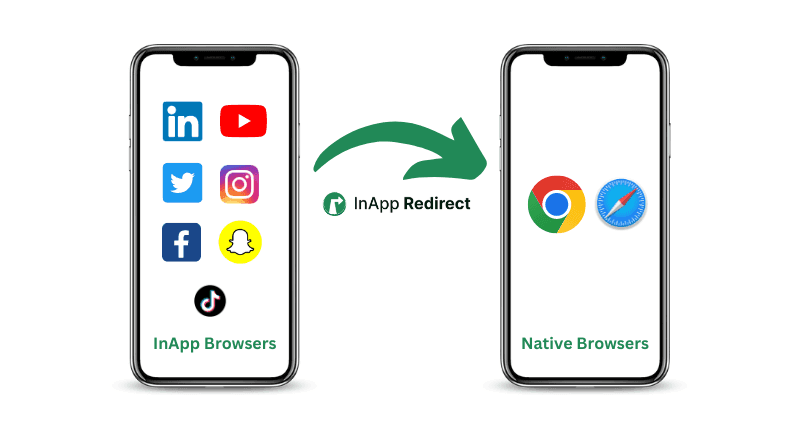
A native browser redirect helps a visitor continue from an app’s embedded browsing window to a separate browser, such as Safari or Chrome.
For example, someone clicks an Instagram ad and your website opens inside Instagram. On a supported journey, the visitor can choose to continue in an external browser.
The destination can remain the same while the browsing environment changes.
This differs from an app-opening link, which routes supported content into an installed app such as YouTube or Spotify.
How the Browser Experience Can Affect Social Ads ROAS
Return on ad spend measures attributed revenue relative to advertising spend:
ROAS = Revenue attributed to ads ÷ Ad spend
If a campaign generates $300,000 in attributed revenue from $100,000 in ad spend, its ROAS is 3×.
Browser routing changes part of the experience after the click. That experience can influence whether a visitor completes a purchase, booking, subscription, or enquiry.
Returning visitors may encounter another login
A customer who is signed in to your website in their regular browser may not have the same session inside an app’s embedded browser.
Opening the destination in an external browser may help if a valid session already exists there. Browser routing does not transfer cookies, create a logged-in session, or bypass authentication.
This can matter for repeat purchases, subscriber articles, booking management, and customer portals.
Forms and payments may behave differently
Password tools, autofill, and payment-provider handoffs can behave differently across browsing environments.
Test the actual task your campaign asks visitors to complete: entering contact details, choosing a booking slot, submitting an enquiry, or making a payment.
The browser handoff adds a step
Visitors may decline the external-browser option, abandon the handoff, or arrive in a browser where they are not signed in.
Include these outcomes in your evaluation. A high redirect rate alone does not demonstrate better campaign performance.
Instagram and Facebook Ads: Test the Journey After the Click
An Instagram or Facebook campaign can bring interested visitors to your website. The landing page and the steps that follow determine whether that interest becomes a completed action.
Start by opening your actual campaign destination from the placement your audience uses. Check whether visitors encounter another login, difficulty completing a form, or an unexpected payment handoff.
For Instagram traffic, explore how Instagram in-app browser bypass can help eligible visitors continue to an external browser.
Test the relevant devices and placements separately. A successful journey from one Instagram placement does not establish that every device or placement behaves identically.
For a broader view of setup options and campaign evaluation, see our guide to improving Meta Ads ROAS with native browser routing.
When Is Browser Routing Worth Testing?
Start with a specific problem you can observe.
- Returning visitors must sign in again: Check whether a valid session exists in the external browser.
- Users abandon a form: Test whether field entry or autofill differs between environments.
- Payment completion is inconsistent: Check the payment-provider handoff.
- Customers report difficulty accessing accounts: Verify the destination and authentication flow.
- Ad clicks exceed successful landing-page arrivals: Investigate loading, redirects, measurement differences, and other possible causes.
Browser routing deserves a test when you identify a plausible browser-related issue. Weak offers, confusing pages, and broken forms still need their own fixes.
How to Test Whether Native Browser Redirects Improve ROAS
1. Choose one primary outcome
Define success before enabling the test.
For a store, that might be completed purchases or revenue. For a travel business, it could be completed reservations. For a publisher, it might be paid subscriptions.
Lead-generation businesses should initially track qualified enquiries or bookings. Calculate revenue-based ROAS only when downstream revenue can be attributed consistently.
2. Record the existing journey
Measure your current campaign’s:
- Eligible visits or assigned users.
- Successful destination arrivals.
- Completed purchases, bookings, or other primary actions.
- Attributed revenue.
- Ad spend.
Use a consistent reporting window. Confirm that your analytics and backend records identify completed actions without double-counting them.
3. Verify the browser handoff
Before evaluating performance, check that:
- The intended page opens.
- The visitor can understand and choose the external-browser option.
- The website remains usable if the visitor stays inside the app.
- Campaign parameters reach the final destination.
- Forms, authentication, and payment flows behave as expected.
Test using the devices and source placements you intend to support.
4. Compare equivalent groups
Where your testing setup permits, randomly assign eligible visitors to:
- Control: The existing browsing journey.
- Treatment: The journey offering external-browser routing.
Keep the destination, offer, and measurement rules consistent. Avoid changing your page design or promotion at the same time.
Include everyone assigned to the treatment group—even visitors who decline or fail the handoff.
Comparing only successful redirects with other visitors can exaggerate the benefit because those groups may differ in motivation or device characteristics.
Keep test assignment consistent across the browser change where technically feasible and privacy-appropriate.
5. Allow enough time for the outcome
Choose the test duration and sample requirements before reviewing results. Account for your normal buying cycle and delayed conversions.
A handful of extra orders does not establish a reliable improvement. If the result is uncertain, report that uncertainty instead of treating a small difference as proof.
Example: How a Conversion Change Affects ROAS
The following figures are hypothetical. They are not InApp Redirect customer results.
Assume two comparable campaign groups have equal ad spend and the same average order value.
Existing journey
- Assigned visits: 10,000.
- Ad spend: $100,000.
- Completed purchases: 200.
- Conversion rate: 2.0%.
- Average order value: $1,500.
- Attributed revenue: $300,000.
- ROAS: 3.0×.
Journey offering browser routing
- Assigned visits: 10,000.
- Ad spend: $100,000.
- Completed purchases: 220.
- Conversion rate: 2.2%.
- Average order value: $1,500.
- Attributed revenue: $330,000.
- ROAS: 3.3×.
Conversion rate increases by 0.2 percentage points, equivalent to a 10% relative increase. With spend and order value unchanged, ROAS also increases by 10%.
The result still needs sufficient evidence to distinguish a real effect from normal variation.
Additional revenue is also different from additional profit. Account for product costs, refunds, and software fees when deciding whether to expand the implementation.
Avoid Mistaking Better Reporting for More Revenue
A change in reported conversions can reflect a measurement change as well as a change in customer behavior.
Compare ad-platform reports with your website analytics and backend orders, bookings, or subscription records. Keep attribution windows consistent and allow delayed outcomes to appear.
Preserving campaign parameters does not guarantee complete attribution. Browser routing does not replace Meta Pixel, Conversions API, consent management, or a sound analytics implementation.
Look for evidence that more valuable actions actually occurred.
Apply the Same Testing Approach to WhatsApp Campaigns
Browser friction can also affect customers returning through WhatsApp messages.
A reader may tap a news alert to access subscriber content. A traveller may open a booking reminder. A customer may follow a renewal message to an account page.
Where the destination opens inside WhatsApp’s embedded browser, the customer’s session from a separate browser may not be available.
WhatsApp in-app browser bypass helps eligible visitors choose an external-browser journey, where a valid website session may already exist.
Evaluate the outcome appropriate to each campaign:
- Ecommerce: Completed repeat purchases.
- News and media: Subscriber access, paid subscriptions, or renewals.
- Travel: Completed bookings or booking-management actions.
- Insurance: Completed servicing or renewal actions, with required identity checks.
- Education: Enrolments, account access, or fee payments.
- Appointment-based services: Confirmed appointments and attendance.
For WhatsApp messaging campaigns, use campaign costs and relevant business outcomes. Do not label a revenue-to-messaging-cost ratio as advertising ROAS unless advertising spend is the denominator.
Frequently Asked Questions
Do native browser redirects always improve ROAS?
No. They may help when the external-browser journey removes a real obstacle. They can also add a step or produce no meaningful change. Test the complete journey.
Will customers remain logged in?
They may already be logged in if a valid session exists in the external browser that opens. InApp Redirect does not transfer sessions or bypass authentication.
Does a higher redirect rate mean better performance?
No. Redirect rate describes an intermediate action. Evaluate completed outcomes across everyone assigned to the test, including failed or declined handoffs.
Can I compare this month with last month?
A before-and-after comparison can help with monitoring, but changes in demand, spend, audience, and offers can influence the result. A concurrent controlled test provides stronger evidence when feasible.
Can businesses outside ecommerce benefit?
Potentially. Browser routing can be relevant to booking flows, subscriber content, course enrolments, enquiries, and customer portals. The benefit depends on the actual journey and should be measured.
Start With One Campaign and a Clear Outcome
Choose a campaign where you have observed browser-related friction. Verify the implementation, compare equivalent groups, and measure completed actions.
For paid Instagram and Facebook traffic, explore native browser routing for Meta Ads to choose an approach that fits your website and campaign.
Written by
About the author

Shubham Saurabh
Connect on LinkedInShare this article
Found it useful? Pass it along.