Post-Click Optimization Use Cases for Social Media Traffic
Stop Losing Customers Because of InApp Browsers
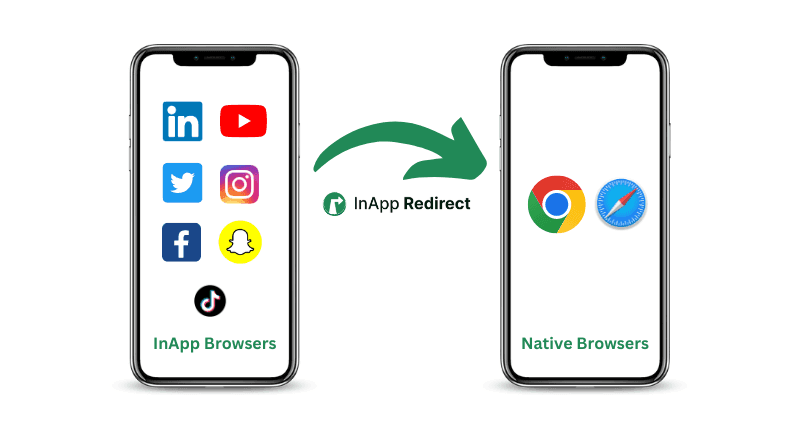
InApp Redirect helps you bypass in-app browsers from social media apps like Instagram, Facebook, TikTok, and more. Send users to their native browser when they click on your social media adsto improve engagement, accurate tracking, and boost conversions.
No credit card requiredSetup in minutesBuilt for Meta traffic
Already being used by performance marketers from
The Hidden Conversion Killer
When a user clicks your link on a social media app, they aren't sent to their default browser like Chrome or Safari. Instead, they're kept inside a restrictive in-app browser. This leads to a broken user experience: saved passwords disappear, checkout sessions are lost, and your analytics pixels fail to fire. InApp Redirect solves this by forcing links to open in the user's native browser, creating a seamless journey from click to conversion.
Who Uses InApp Redirect?
From global brands to individual creators, anyone relying on social media traffic benefits from a smoother, more reliable user journey.
E-commerce Brands
In-app browsers often lead to cart abandonment — users can’t auto-fill payment details, and Facebook Pixel or GA4 tracking breaks, corrupting your data. InApp Redirect enables a seamless mobile checkout experience by opening links in the native browser, where users are logged in and payment info is saved. This simple fix helps you boost mobile conversions and collect accurate data to optimize ad spend. Stop losing sales to a broken in-app flow.
Link Aggregation Platform
Your platform’s value depends on accurate analytics and reliable redirection. In-app browsers often block affiliate attribution and skew tracking. With InApp Redirect, you offer native browser redirection — ensuring accurate click tracking from social media. It improves your clients’ results, increases affiliate revenue, and positions your service as a premium, trustworthy platform.
Creators & Adult Content Platforms
Every click from social media matters. But in-app browsers often log users out of platforms like OnlyFans or Patreon — hurting your conversions. InApp Redirect lets you bypass Instagram’s in-app browser for OnlyFans and similar platforms, sending fans directly to their native browser where they’re already logged in. This dramatically increases the chance of conversion, turning followers into paying supporters with fewer clicks.
SaaS and tech companies
First impressions count — especially for free trials and demos. But in-app browsers often break interactive flows or add friction to sign-ups. Use InApp Redirect to ensure a smooth, reliable mobile onboarding experience by opening links in a fully functional browser. You’ll reduce drop-off during sign-up, improve your product’s perceived quality, and convert more trial users into paying customers.
Share branded or default short links to demos, onboarding guides, and feature announcements. Test landing-page destinations with a rotator, then update documentation links when your product changes.
Link-in-Bio Tools
Many link-in-bio tools trap users in in-app browsers, hurting engagement and conversions. By integrating InApp Redirect, you offer a premium experience — ensuring links open in the native browser from Instagram bios. This becomes a standout feature for your tool, offering better engagement and user experience than standard Linktree-style alternatives.
FinTech & Payment Platforms
Payment journeys rely on gateway redirects, OTP verification, bank-app handoffs, KYC, and callback URLs—steps that may not work consistently inside in-app browsers. InApp Redirect helps eligible users continue in Chrome or Safari, where authentication and payment flows are generally more reliable. This reduces transaction friction, improves completion rates, and provides clearer funnel tracking.
Real estate and PropTech
Add QR codes to property brochures and signs for listing pages or virtual tours. Update a listing link when availability changes, and use Geo Targeting to send campaign traffic to regional property pages.
Automotive companies and dealerships
Share vehicle offers through branded links and showroom QR codes. Send regional audiences to the relevant dealership page and update campaign destinations as inventory or test-drive promotions change.
Travel and hospitality
Use one international campaign link to route visitors to regional travel offers. Add QR codes to guest materials for local guides, and set link expiry for time-limited packages.
Events and education
Share registration links in emails, posters, and presentations. Use QR codes for quick access, passwords for selected preview links, and editable destinations to move from registration to event resources.
Publishers and media teams
Share readable links to articles and newsletters using your own domain or InApp Redirect’s default short links. Organize them by publication, review click activity, and update destinations when content moves.
Why Brands, Creators, and Influencers Choose InApp Redirect
Whether you run a business, grow a creator audience, share affiliate offers, or manage marketing campaigns, give people a smoother journey from your shared links to your content, products, and services.
01
Increase Conversions
Remove friction and make it easier for users to buy, sign up, or subscribe.
02
Ensure Accurate Tracking
Make sure your analytics and ad pixels fire correctly every single time.
03
Improve User Experience
Give users a familiar, fully-functional browsing experience they trust.
04
Simple 5-Minute Setup
No code required. Simply wrap your link with our tool and you're ready to go.
Combine short links with targeting, testing, analytics, and sharing controls. Choose the features that support your campaign, then manage them in the InApp Redirect Dashboard.
Send international traffic to regional offers
Run one international campaign with Geo Targeting. Direct visitors to the store, offer, or landing page configured for their location, using your branded domain or an InApp Redirect default short link.
In practice: An international retailer shares one link with different destinations for the US, UK, and India.
Use a link rotator to send traffic to different landing pages or affiliate offers. Set your own traffic percentages, or rely on Smart A/B Testing and Smart Redirection to manage the split without manual percentage inputs.
In practice: A campaign team compares four offer destinations and reviews recorded redirects in the Destination analytics tab.
Add Facebook, Google, or custom pixels to branded links when sharing products, articles, and offers. Connect link activity with your advertising tools, then manage retargeting audiences and follow-up ads in the relevant platform.
In practice: A brand shares a product guide and uses its connected advertising tools to plan follow-up campaigns.
Generate QR codes for packaging, brochures, displays, and presentations. Give visitors a scannable route to product information, registration pages, or offers through a short link you can manage in the Dashboard.
In practice: A product team puts a QR code on packaging so customers can open its setup guide.
Update the destination when a product sells out, a promotion changes, or an article moves. Keep the branded or default sharing address already used in your posts and emails while directing future clicks to the updated page.
In practice: An ecommerce team switches a seasonal collection link to the next collection without editing every post.
Create separate links for newsletters, social posts, and partner placements. Review recorded clicks and location, device, operating system, and browser breakdowns to guide your next distribution decisions.
In practice: A marketing team compares click activity from a newsletter link and an Instagram profile link.
Set an expiry date for event links and limited-time offers. Add a password when visitors should enter a code before continuing through the short link. Link expiry and password protection are available on Growth and Pro. Plan usage limits apply.
In practice: An event organizer gives invitees a password for a preview link and sets an expiry date after the event.
Use your own branded domain for a recognizable sharing address, or start with InApp Redirect’s default short links. On Growth and Pro, group links into folders and add tags for clients, campaigns, and placements so your team can find and update them later.
In practice: An agency groups each client’s links in a folder and tags links by campaign and channel.
Brands, Creators and Influencers use InApp Redirect to turn high-intent social traffic into journeys that feel faster, convert better, and measure cleanly.
★★★★★
A true set and forget solution for anyone who is struggling with conversions on social platforms. We started seeing results within 2 days after seamlessly migrating visitors out of the In App Browser and noticed a sizeable uptick in conversion rate.
AS
Anoop Sudhakaran
★★★★★
We saw the difference in the first week. Our Instagram traffic finally reached the browser experience we had actually designed—and checkout completion moved with it.
MP
Maya Patel
Marketing Manager
★★★★★
InApp Redirect removed a layer of friction we had almost accepted as normal. The setup was simple, the impact was measurable, and our attribution is far more reliable.
DK
Daniel Kim
Performance Marketing Lead
★★★★★
Our paid social journey now feels like one continuous experience. Customers land where they expect to, payments behave properly, and the team spends less time debugging edge cases.
SM
Sofia Martinez
Ecommerce Director
★★★★★
The best part is how invisible it feels to the customer. Behind the scenes, though, it has helped us recover high-intent sessions we were previously losing.
EB
Ethan Brooks
VP Digital Marketing
★★★★★
We launched it across creator campaigns in an afternoon. Cleaner journeys, cleaner data, and a noticeable lift in the traffic that actually made it to product pages.
AR
Aisha Rahman
Growth Partner
★★★★★
For a small team, anything that improves conversion without adding operational overhead is a win. This has become a quiet but essential part of our acquisition stack.
NW
Noah Williams
Founder
★★★★★
We were investing heavily in Meta, but the post-click experience was letting us down. Redirecting into the right browser gave that traffic a much better chance to convert.
OC
Olivia Chen
CMO
★★★★★
The rollout was refreshingly straightforward. Within days, our team had better visibility into customer journeys and fewer reports of broken payment sessions.
MJ
Marcus Johnson
Product Lead
★★★★★
Our affiliate links finally open where customers want them to. That tiny shift made the whole journey feel faster, more trustworthy, and much easier to complete.
PS
Priya Shah
Marketing Director
★★★★★
It solved a problem that sat between marketing and product for months. Now both teams can focus on improving the journey instead of explaining where it breaks.
LC
Liam Carter
Director of Product & Growth
★★★★★
The conversion lift mattered, but the customer experience mattered just as much. People now get the fast, familiar browser flow our brand promises everywhere else.
AO
Amara Okafor
Customer Experience Lead
★★★★★
One clean implementation replaced a collection of workarounds. It is simpler for our team and noticeably smoother for every visitor arriving from social.
JM
Jack Miller
Marketing Manager
Frequently Asked Questions (FAQs)
Embed our lightweight JavaScript pixel directly into your destination website. When a user visits your site from apps like Instagram or Facebook, our technology detects that they are viewing your site in an in-app browser. It then automatically triggers a redirect to open your site in the user’s default browser (like Safari or Chrome).
This detection and redirection happens seamlessly, in a split second, ensuring a smooth and consistent user experience — no additional link wrapping or manual work needed on your campaigns.
They keep users logged into their accounts, remember their payment and shipping information for autofill, and work seamlessly with password managers. In-app browsers often block or break these conveniences, creating friction that hurts conversions. By redirecting users to their default browser, you remove these barriers — making it easier for them to complete purchases or sign-ups, which leads to higher engagement and better conversion rates from mobile traffic.
In-app browsers often block or interfere with tracking scripts and cookies, leading to incomplete or inaccurate data. By redirecting users to their native browser, you create a stable environment where tracking tools — like Facebook Pixel, Google Analytics, and others — can function as intended. This ensures your events are recorded accurately, so you can confidently measure conversions, build audiences, and optimize campaigns based on reliable data.
It’s effective for links shared on Instagram, Facebook, TikTok, and more. You can even use it with links that have already been shortened by services like Bitly or alongside your link-in-bio tool. Our goal is to be the universal solution that eliminates the in-app browser problem, no matter where your traffic comes from.
Yes. Geo Targeting sends visitors to different destinations based on their location. Configure the regional stores, offers, or landing pages you want each audience to reach behind one branded or default short link.
Use a link rotator and add the destination URLs you want to test. Assign traffic percentages yourself, or rely on Smart A/B Testing and Smart Redirection to choose the split automatically. Review recorded redirects in the Destination tab of analytics; manual weighted routing makes a new random selection on each click.
Yes. Add Facebook, Google, or custom pixels to branded links to support audience building. Manage your audiences and follow-up campaigns in the relevant advertising platform.
Use QR codes to connect brochures, packaging, signs, and presentations with your online content. Use an editable short link as the sharing address and manage its destination in the InApp Redirect Dashboard.
No. You can use an InApp Redirect default short link, such as sl.inappredirect.com/exa-m-ple, or connect your own branded domain for a recognizable address.
Use native browser routing for website destinations shared through Instagram, Facebook, and other supported in-app browsers; user consent is required to continue to Chrome or Safari. Domain Setup serves site-wide website routing, while SmartLink serves individual links. Use Deep Link or App Opener when the destination should open in a supported installed mobile app.
Expert guidance
Every click you lose is money left behind!
Every time a user struggles in an in‑app browser and drops off, it’s not just a lost opportunity — it’s real money slipping through the cracks, directly hurting your bottom line. Don’t let another day of lost sales pass you by.
Practical recommendationsNo-obligation conversationBuilt around your use case
Free discovery call
Get answers specific to your campaigns
Walk through your current setup with our team and leave with clear next steps.