
The Silent Killer of Your Instagram Ad Campaigns
It starts with an ad—a beautifully crafted Instagram campaign, capturing the essence of your brand. The visuals are perfect, the CTA irresistible, and the audience eagerly clicks the link. But what happens next is the marketer's nightmare.
As the link opens in Instagram’s InApp Browser, everything slows down. The user waits, frustrated by sluggish loading. They try to enter their details, but autofill isn’t working. They want to save the page to return later, but there’s no way to retain the session.
Another conversion lost. Another campaign underperforms.
Instagram’s InApp Browser may seem like a minor detail to users, but for marketers, it’s a silent killer, eroding performance, analytics, and user experience. Let’s uncover why this happens and how InApp Redirect can transform your campaigns into success stories.
Instagram’s InApp Browser is designed for convenience, allowing users to open links without leaving the app. However, for marketers and advertisers, it introduces significant challenges, slowing down campaigns, complicating analytics, and bad user experience.
In this blog, we’ll explore the limitations of Instagram’s InApp Browser, its impact on your social media ads campaigns, and how InApp Redirect provides a seamless solution to overcome these challenges and improve your Return on Ad Spend (ROAS).
If you want to understand the deeper reason Instagram traffic converts poorly, you should read our full breakdown on Why In-App Browsers Kill Your Meta Ads Conversions.
Why Instagram’s InApp Browser is a Problem for Campaigns?
Imagine hosting a party where everything is perfect—except the venue is too cramped, poorly lit, and missing basic amenities. That’s what Instagram’s InApp Browser does to your campaigns although Instagram’s InApp Browser keeps users within the app, and we all know why!!
- Reduced Performance: Pages load slower inside inapp browsers compared to native browsers like Chrome or Safari, leading to user drop-offs. Our Parent company Auditzy has process over 8Bn+ page views in 2025, and found out that Instagram Inapp Browsers load times are 15% slower than the regular browser. Every extra second of load time means more users abandoning the journey.
- Tracking Issues: Without cookies and third-party script support, your Google Analytics and Facebook Pixel struggle to capture meaningful data. The insights you need to refine campaigns? They vanish into thin air.
- Limited Features: Critical browser features like autofill, saved passwords, and multiple tabs are missing, creating a frustrating user experience.
- No "Buy Later": All sessions and browsing history vanish as soon as the buyer closes the browser. Without cookies, there's no way to retain memory.
We’ve also covered how Meta ad traffic is affected overall in our guide on How to Increase Meta Ads Conversions, where Instagram’s In-App Browser plays a major role.
How InApp Redirect Solves This Problem?
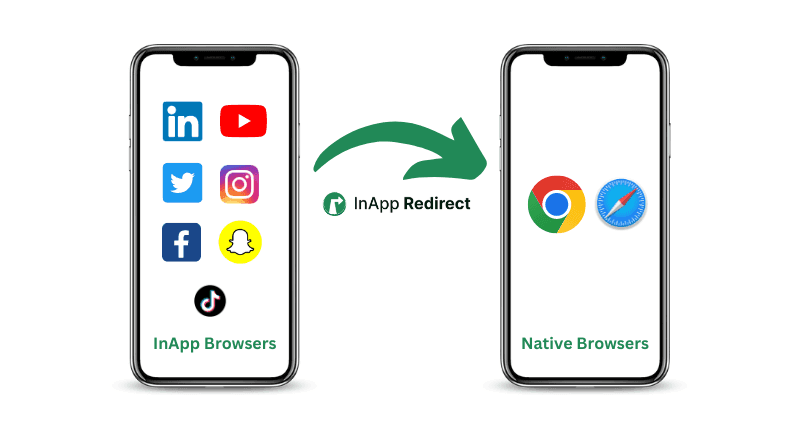
Now, picture this: the same user clicks your ad, but instead of being trapped in Instagram’s InApp Browser, they’re seamlessly redirected to their native browser—Chrome or Safari. Everything works perfectly, and they complete their journey effortlessly.
That’s the power of InApp Redirect.
InApp Redirect is a powerful solution designed specifically to bypass InApp Browsers like Instagram’s and redirect users seamlessly to their preferred native browsers like chrome and safari. Here’s how it works and why it’s the ultimate tool for your social media ads campaigns:
1. Seamless Native Browser Redirection
InApp Redirect automatically detects when users are accessing links through Instagram’s InApp Browser. As soon as it detects the InApp Browser, It instantly redirects them to Chrome/Safari depending upon the Operating System of the user like Android/iOS, ensuring a faster, smoother experience.
2. Accurate Tracking and Analytics
With InApp Redirect, your campaign tracking tools, such as Google Analytics and Facebook Pixel, work flawlessly. You’ll get precise data on user behavior, enabling better retargeting and optimization.
3. Improved User Experience
By redirecting users to a native browser, features like autofill, saved passwords, and tabbed browsing becomes available instantly for the buyers. This convenience enhances user satisfaction and encourages conversions.
4. Plug-and-Play Integration
No complicated setup is needed. Simply integrate InApp Redirect Pixel/Script, into your website footer or GTM for free and it starts working as soon as it's live on your website.
If Facebook traffic is also part of your campaigns, here’s a detailed comparison showing how to Bypass Facebook’s In-App Browser for better ROAS.
Why brands chose InApp Redirect for bypassing Instagram inapp browser?
Brands who are using InApp Redirect have seen benefits like below for the redirected users:
- upto 70% buyers who comes from instagram ads chose to get redirected to the their native browsers like chrome/safari
- upto 30% buyers who comes from facebook ads chose to get redirected to the their native browsers like chrome/safari
- upto 80% buyers who comes from instagram ads and are on iOS device chose to get redirected to the their native browsers like chrome/safari
- upto 40% buyers who comes from instagram ads and are on Android device chose to get redirected to the their native browsers like chrome/safari
- upto 25% growth in Average Page Views
- upto 30% growth in Average Session Engagement Time
- upto 25% growth in Conversions
The difference is clear: InApp Redirect doesn’t just solve inapp browsers problem; it unlocks the full potential of your campaigns via bypassing them.
Step-by-Step Guide: Using InApp Redirect for opening website in external browser rather than Instagram browser ?
Ready to take control of your campaigns? Follow these simple steps:
Step 1: Signup for InApp Redirect
Step 2: Add InApp Redirect Pixel/Script into your website footer or GTM. That’s it—you’re live!
For a broader technical view, you can also read our guide on Opening Links in Default Mobile Browsers, which explains how external browser redirection works under the hood.
If you want to understand different real-world scenarios where native-browser redirection improves conversions, check out our In-App Browser Redirection Use Cases.
If you’re concerned about user privacy or security risks inside app-embedded WebViews, here’s an important read: Security of In-App Browsers: What You Need to Know.
Key Takeaways
- Instagram’s InApp Browser creates challenges for tracking, user experience, and campaign performance.
- Redirecting users to native browsers improves engagement, analytics, and conversions.
- InApp Redirect is the ultimate solution for bypassing InApp Browser limitations, ensuring your campaigns deliver maximum results.
Don’t let Instagram’s InApp Browser hold your campaigns back. Get started with InApp Redirect today and watch your conversions soar.
Written by
About the author

Shubham Saurabh
Connect on LinkedInSharing a video from Instagram? Learn how to open YouTube links in the app and what to expect when the visitor’s device or browser keeps the link on the web.
Return to BlogsShare this article
Found it useful? Pass it along.